This walkthrough assumes you have registered for the site and logged in. If you have not registered for the site, see that stage of the walkthrough on the registration page.
So now you’re registered, and would like to solve some puzzles!
1. Select the “Play Puzzles” page
Press the Rätselspaß button in the fourth tab at the top of any page on the site The result will be this page:

2. Select the “Daily Puzzles” page
There are several different sections with lots of different puzzles, but in this walk-through we will concern ourselves with the top-right one, about daily puzzles. There is no charge for participation.
Click on the Uberraschungsratsel box, or the link beneath it. The result will be this rather long page:

3. Select a daily puzzle to play
Arguably the daily puzzles are the heart of the site; success in the daily puzzles drives progress through the site’s internal grading scheme, as discussed later.
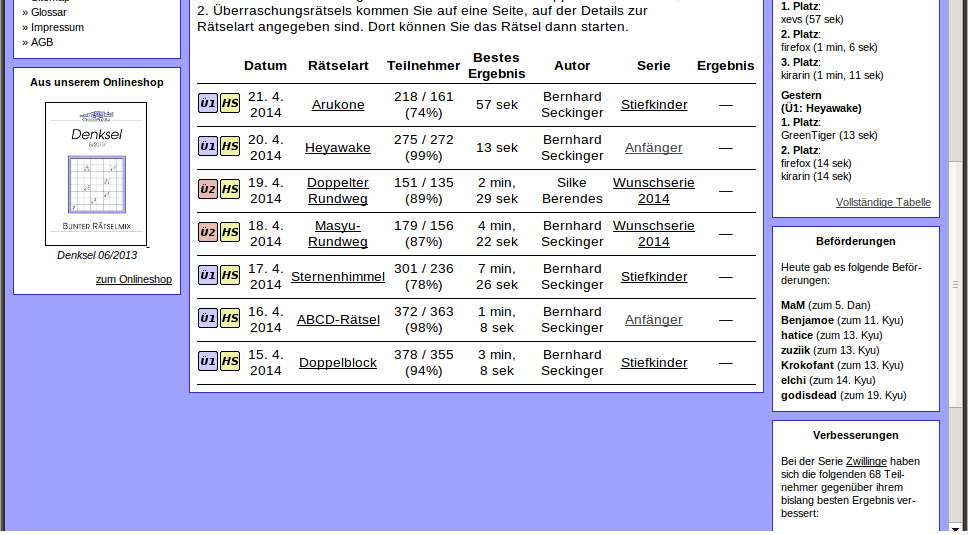
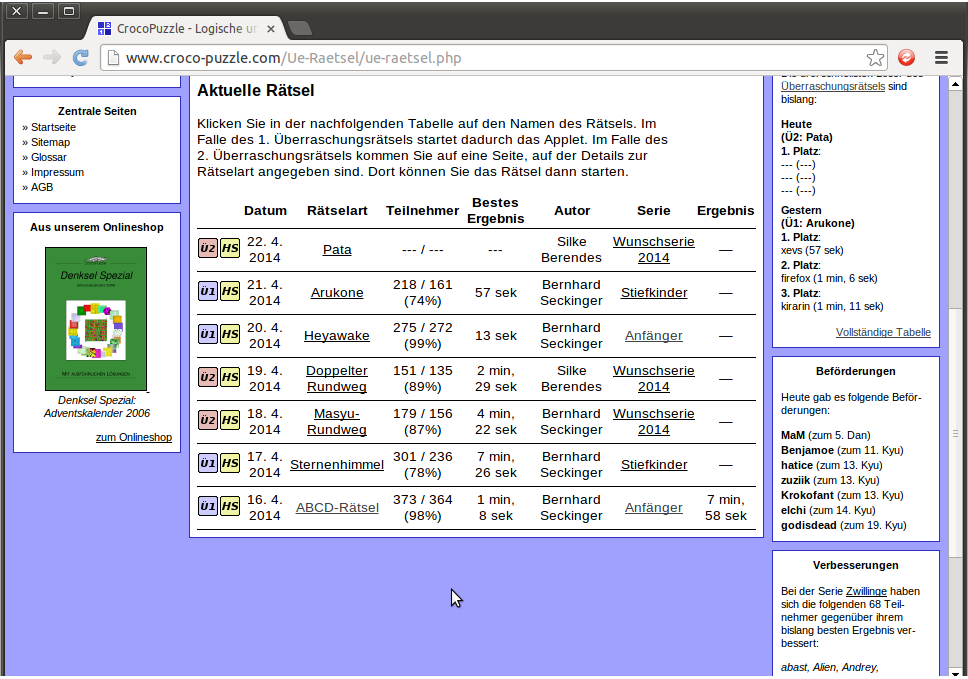
The top of the page provides an explanation, in German, as to how the series works. The big table at the bottom of the page shows what daily puzzles are available. In general, a puzzle will be published each day at 11pm UK time, and the past seven puzzles are available to play at any one time.
Puzzles will be listed as either “U1” in blue or “U2” in red. “U1” puzzles are one of the 40 standard types, and solved using an applet, in a process very similar to that of the prize puzzles. “U2” puzzles will not fall into one of the 40 standard types and are published as .pdf files which you might choose to solve on-screen using a graphical scratchpad or to print out and solve on paper. Either way, “U2” puzzles will generate answer codes for you to submit.
Looking again at the table at the bottom of the page, the columns from left-to-right read as follows:

1) U1/U2 – a description of what format the puzzle takes (U1 for applet, U2 for .pdf).
2) HS – a link to the puzzle’s high-score table.
3) The date on which the puzzle was posted.
4) The type of the puzzle.
5) Two numbers and a percentage – these represent the number of people who have attempted the puzzle and the number who have completed it, also expressed as a percentage ratio of finishers to starters.
6) A time – the fastest time in which the puzzle was solved.
7) A name – the name of the author.
8) A series name – each puzzle is associated with a series, and clicking on the name of the series links to an overall scoring system for the puzzles in that series.
9) Either a dash or a time – if you have solved a puzzle, your time will be listed here.
So not to spoil any of the seven live puzzles, we’ll consider the 16.4.2014 ABCD-Ratsel puzzle, recently concluded at the time of writing. Clicking on the HS button produces a long page, the top and bottom of which are as follows:
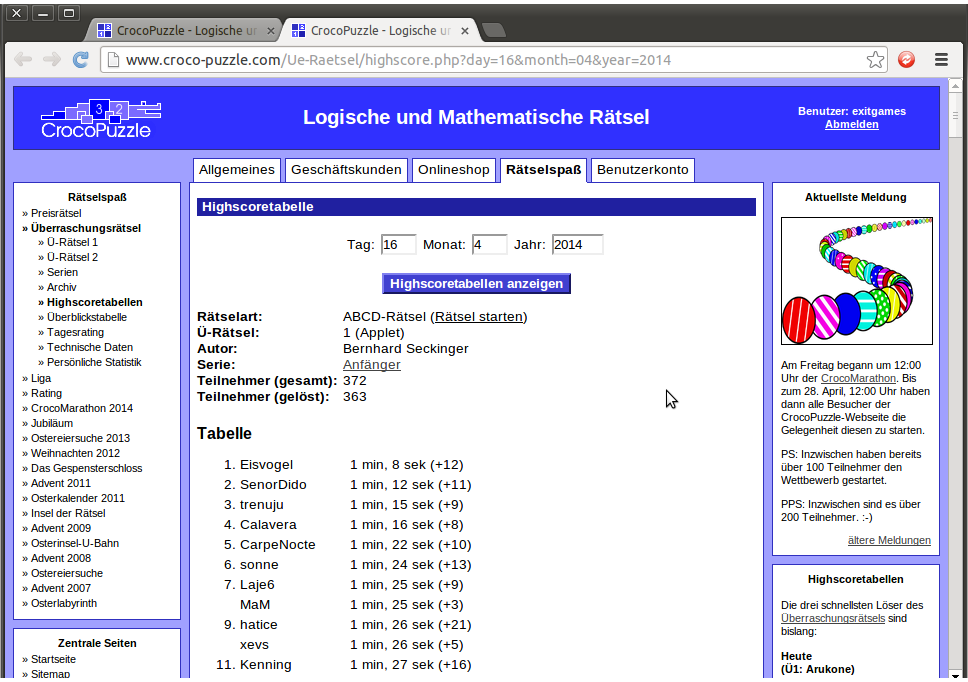

So the fastest solvers in the world can solve this puzzle in under a minute and a half, and the slowest solvers to complete the puzzle generally do so in about 7-10 minutes. This looks like a puzzle that can be solved in a manageable length of time.
You don’t have to solve every puzzle; pick a puzzle type that you’re familiar with (and, again, you can get familiarity with the puzzle types from solving the archives of the prize puzzles) and of a level of difficulty that suits you at that particular moment in time. To begin with, pay more attention to the times taken by the slowest solvers than the fastest ones.
4. Playing a U1 (applet) puzzle
We’ll return to the previous page…
…and click on where it says ABCD-Ratsel. After the Java applet loads, this is produced:
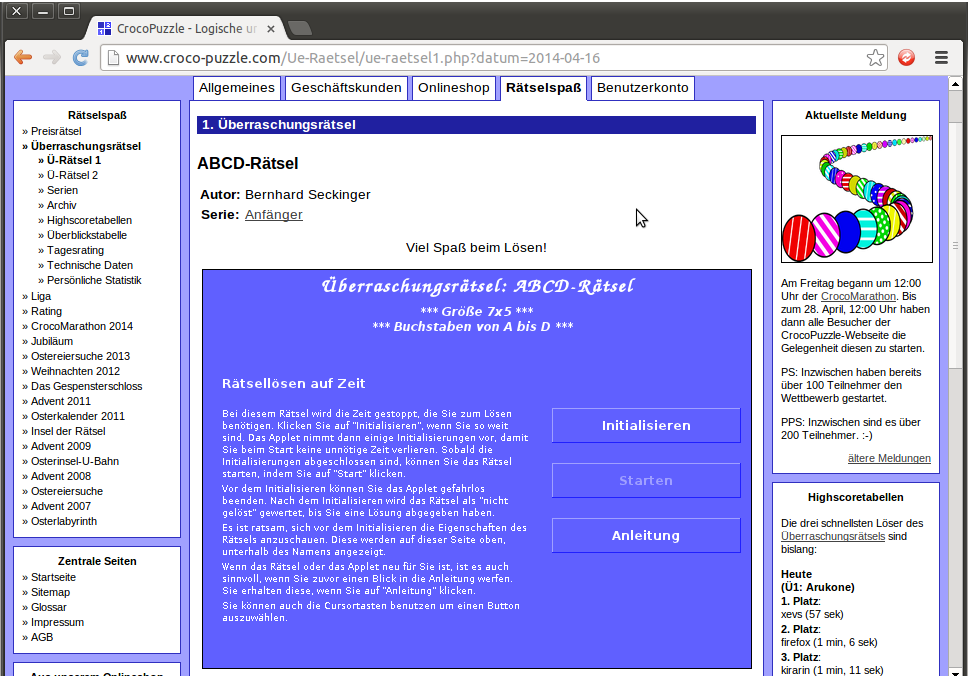
As with the prize puzzles, the “Anleitung” button leads to a page of instructions. If you are sure you want to commit to finishing the puzzle, click on the “Initialisieren” button. (Beware! Committing to finishing the puzzle and not doing so will count against you in the site’s ranking and rating systems.) Once you have pressed the “Initialisieren” button, the “Starten” button becomes active and starts the timer for the puzzle.
In this instance, clicking on Starten produces the following puzzle:
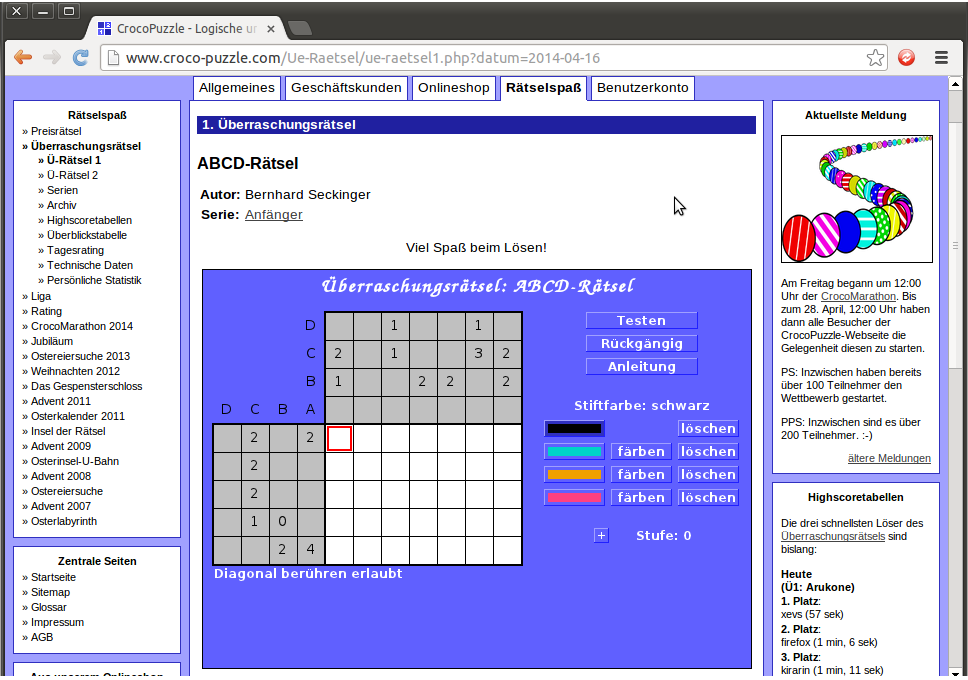
You may or may not be familiar with ABCD puzzles, possibly under another name. There are plenty of them to practice at the brilliant janko.at puzzle site. However, if you’re not familiar with them, or any of the other applet puzzles at Croco-Puzzle, there’s a list of translations at the UKPA forum.
Looking at the translation for this puzzle, there are only two rules:
“Write one letter from the given range in every cell, so that no two horizontally or vertically adjacent cells contain the same letter.
The numbers given at the side and top of the grid indicate how many times each letter should appear in the respective row or column. (If any of the clue numbers are mising, it is up to you to deduce what value should be there.)”
Additionally, the puzzle says “Diagonal berühren erlaubt”, which suggests that two diagonally touching cells can contain the same letter. (Some puzzles have the extra constraint of “Diagonal berühren verboten”, in which diagonal touching is barred as well.)
Returning to the puzzle, we will work through it step by step.
The puzzle is seven cells wide, by five cells tall. Look at the bottom row; its seven cells must contain four A cells, but they cannot touch each other. This means we can place them all at once. Similarly, look at the sixth column; its five cells must contain three C cells, but they cannot touch each other. This means that we can place them, too, all at once. Doing so gives this result:
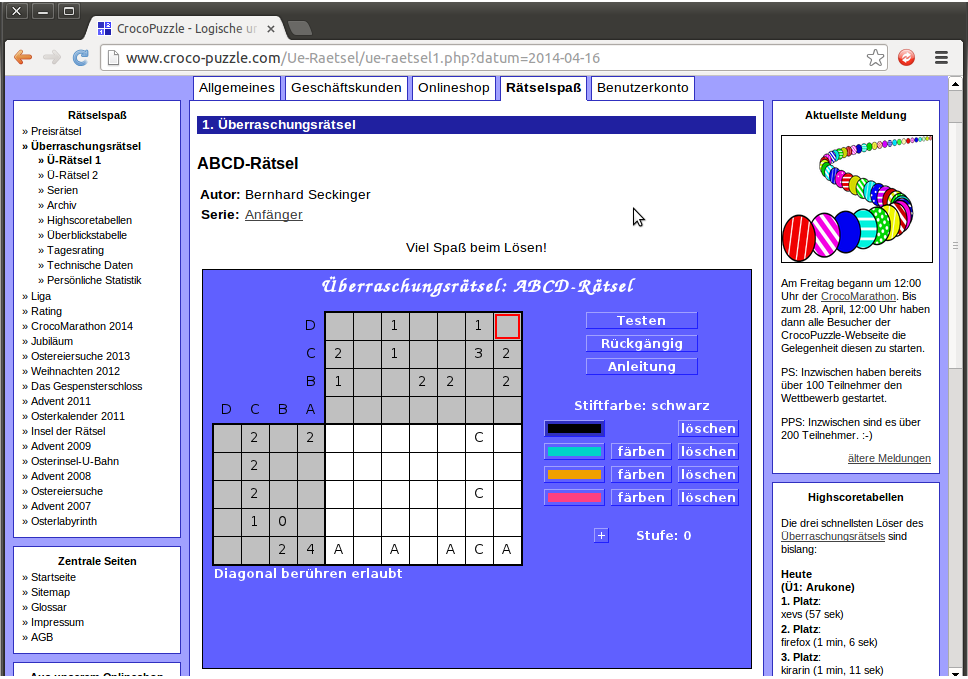
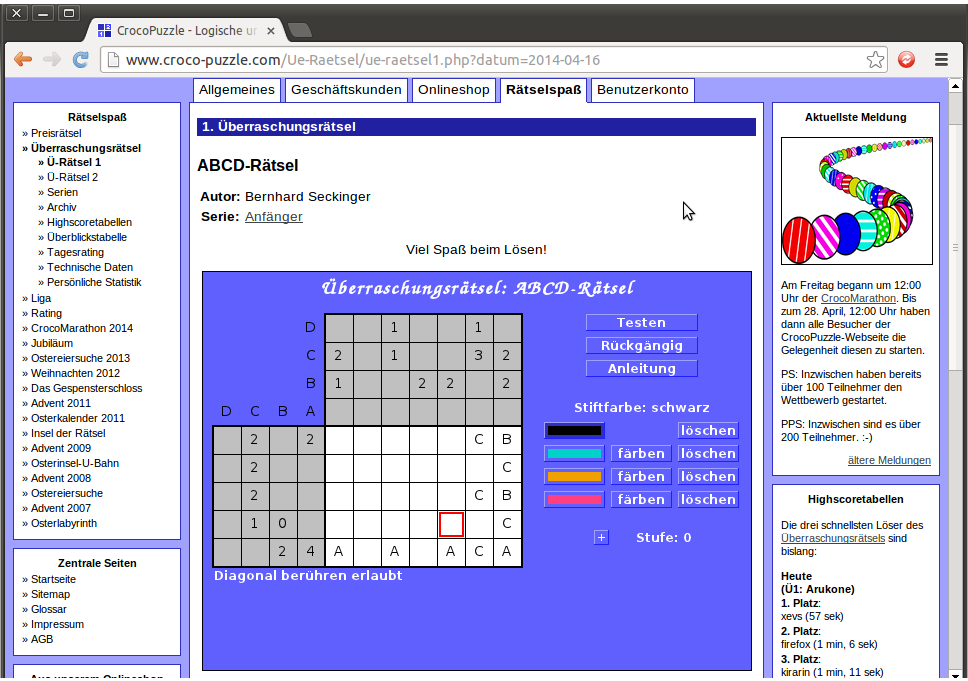
Look at the seventh column. It has two C cells. The bottom cell is filled in, and we know that the C cells in the seventh column cannot be horizontally adjacent to the C cells in the sixth column. This means that we can place them. The seventh column also has two B cells and two cells remaining. Placing them gives this result:
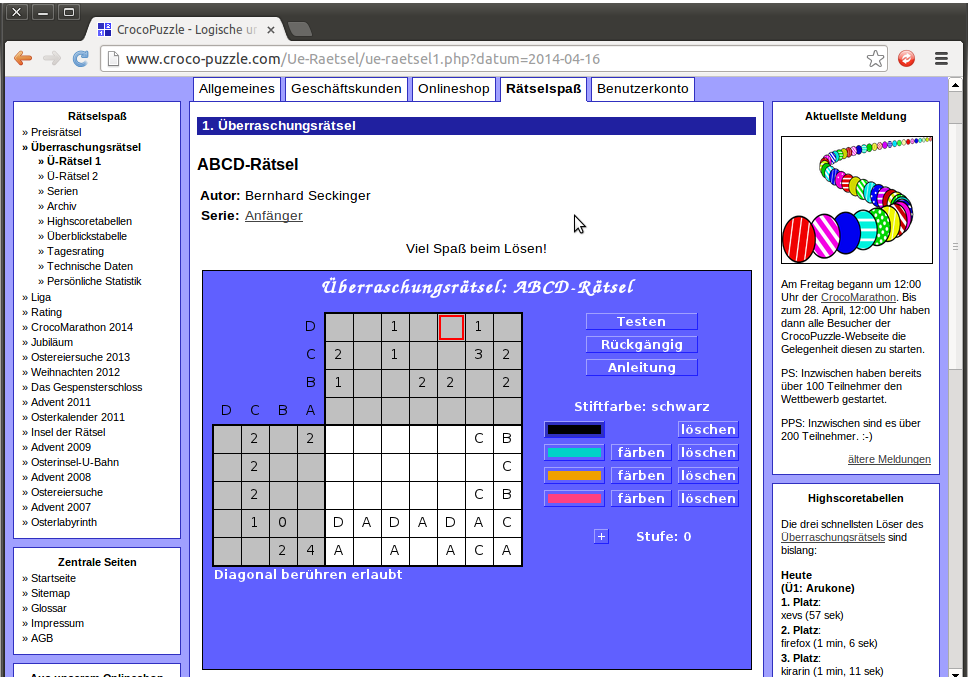
Next, look at the fourth row. It has one C cell, which has already been placed, and no B cells. This means that all unfilled cells must be Ds or As. However, we have already placed three A cells in the fifth row, and no two vertically adjacent cells can contain the same letter. This means we can fill the cells vertically adjacent to the A cells in the fifth row with Ds, and the remaining cells in the fourth row with As, to give this result:
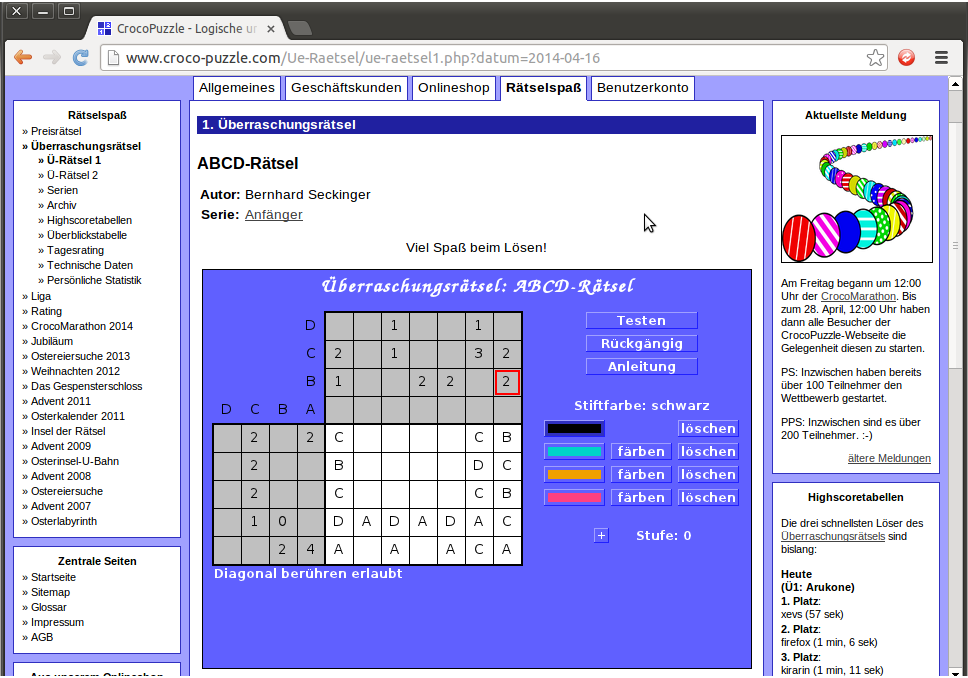
Look at the sixth column. It has one D cell and one cell remaining empty, so we can fill it. Look also at the first column. It has three cells remaining empty, of which two are C cells and one is a B cell. As the C cells cannot be adjacent, we can fill the first column as well, like so:
Look at the fifth column, where we can use similar logic. It has three cells remaining empty, of which two are B cells. As they cannot be adjacent, we can fill them in. After that, we can look at the fourth column. It has four cells empty, of which two are B cells. As these B cells cannot be adjacent to the B cells in the fifth column, we can fill these in as well. Lastly, looking at the seventh row, there is one cell remaining empty but we know that it must contain two B cells. Filling all these in gives us this:
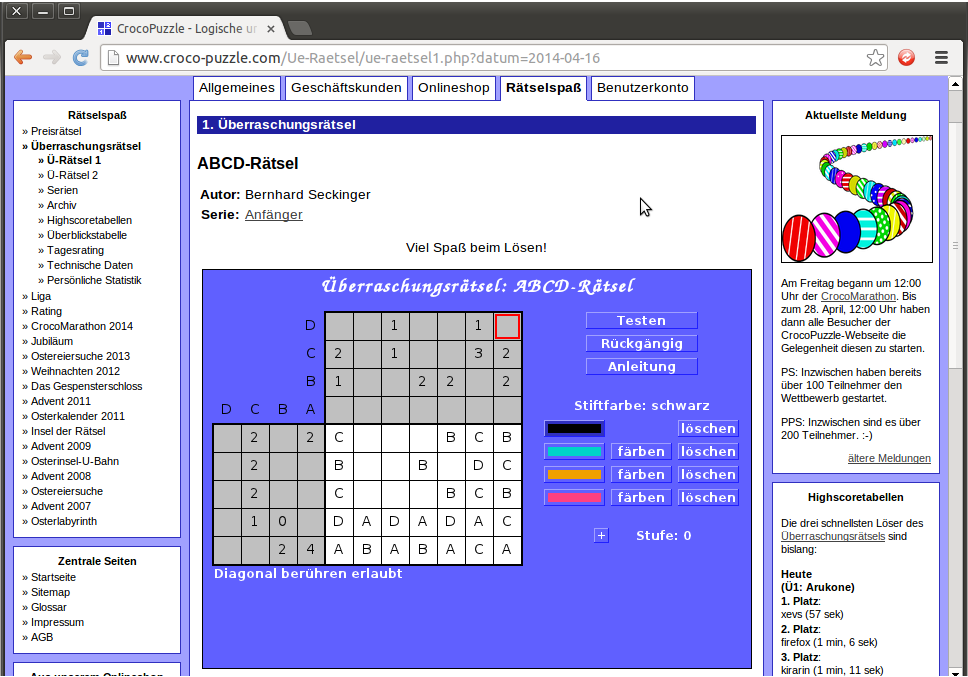
Look at the first row. This has three empty cells, of which two are A cells. Hopefully by now the logic is familiar and we can fill them in as follows:
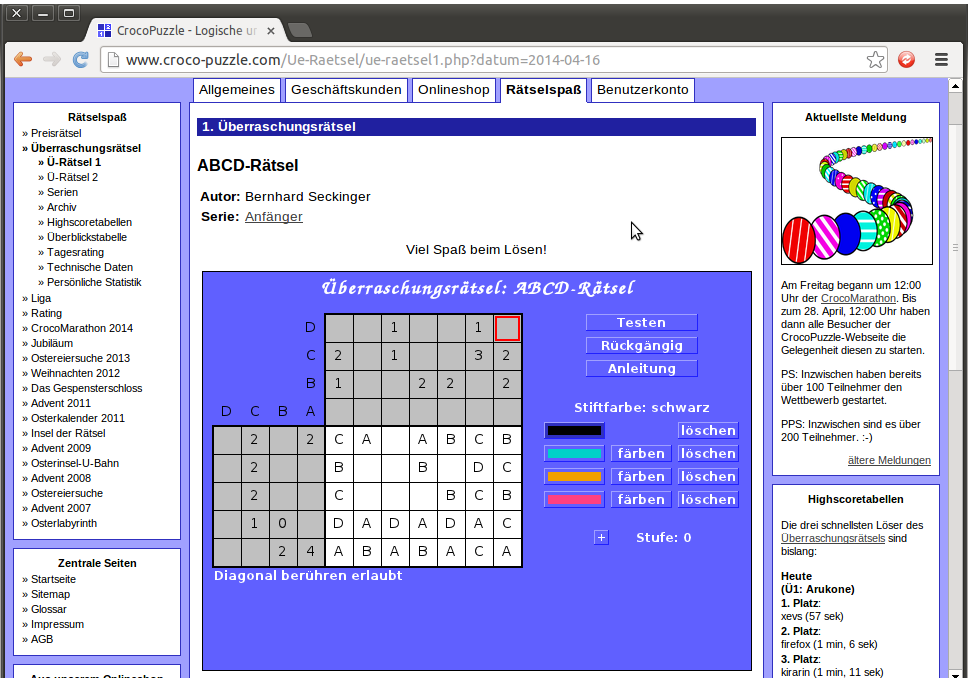
Next, we use slightly different logic when looking at the third column. As the top row contains two A cells and two C cells, which have already been placed, the cell in the third column must be a B or a D. However, the third column only contains one D, which has already been placed, so the cell must be a B.
We use different logic again to fill in the cell in the second row and the third column. We note that the third column contains one C cell. The third row only contains two Cs, which have already been placed, so the third row cannot be that C cell. Accordingly, the second row must contain a C. Adding those in gives:
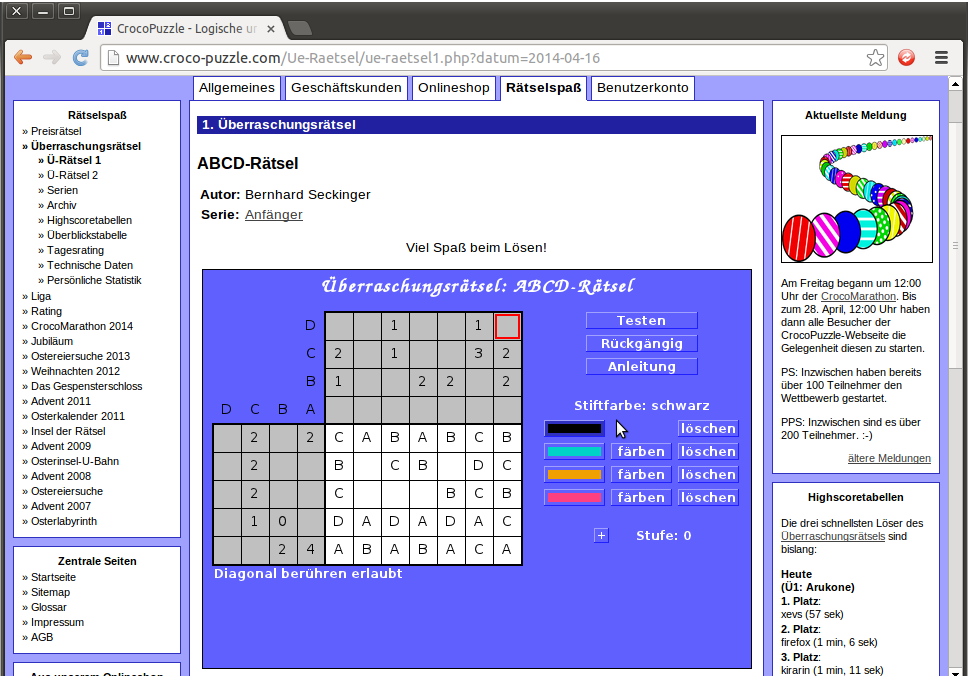
We can fill in the rest of the second row. The second cell is adjacent to an A, a B and a C, so must be a D. The fifth cell is adjacent to a B and a D so must be an A or a C, but the row only contains two Cs which have both been placed, so the fifth cell must be an A. We use similar logic on the third row: the fourth cell is adjacent to an A and a B so must be a C or a D, but the row only contains two Cs which have both been placed, so the fourth cell must be a D. Filling those in leaves just two cells blank:
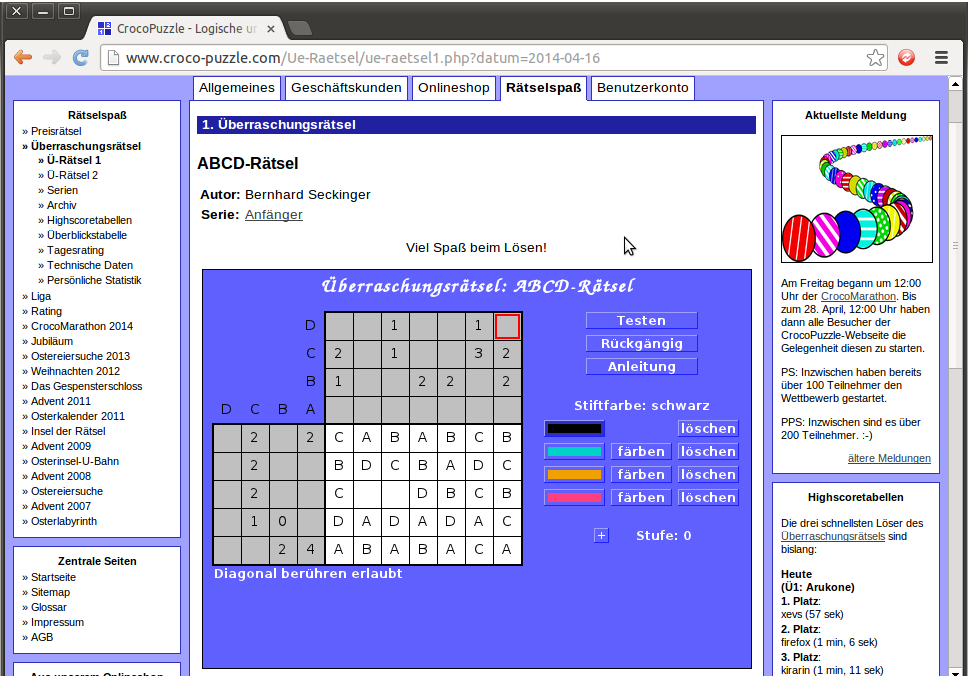
The leftmost empty cell is adjacent to an A, a C and a D, so must be a B. The rightmost empty cell is now adjacent to a B, a C and a D, so must be an A. Let’s fill those in:
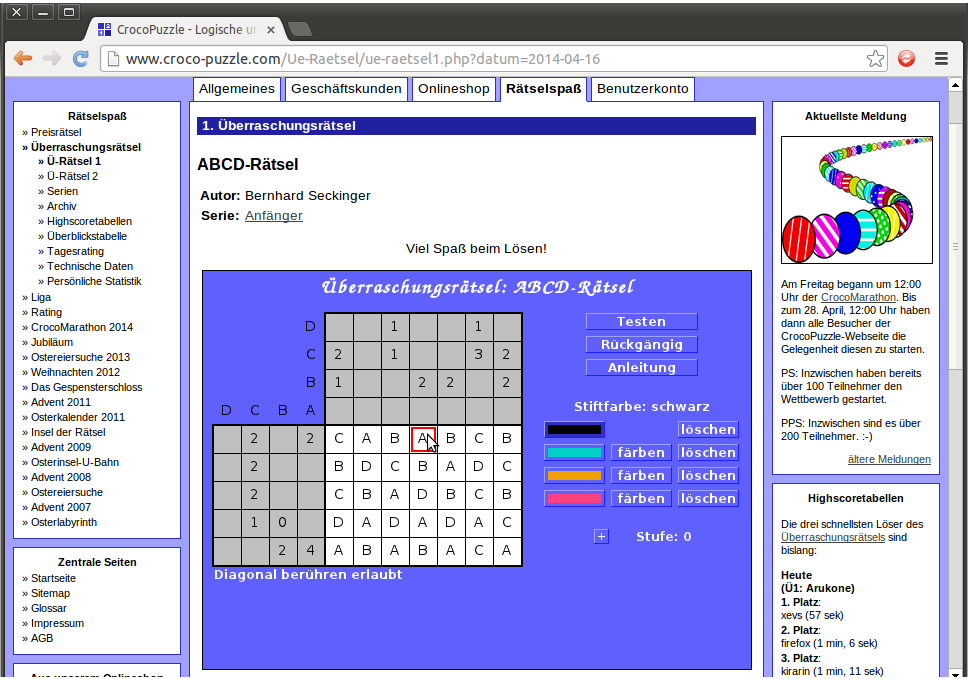
Finally, check all the row and column constraints thoroughly, and check to make sure there are no horizontal or vertical adjacencies, as required. Once you’re happy with your solution, press “Testen” to test it. If it’s incorrect, any unfilled or incorrectly filled cells will flash red. If it’s correct, all the cells should flash blue, like this:
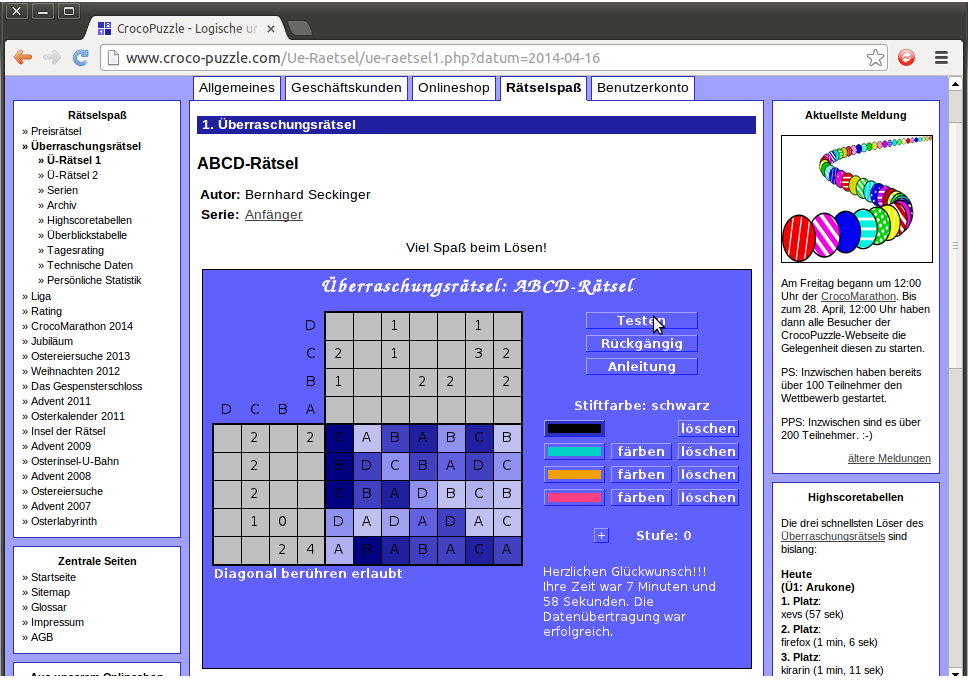
The time you took to solve the puzzle is displayed. (Occasionally, if the correct answer has not been transferred to the server correctly, this will be noted in red, but without any cells being highlighted. If this happens, press “Testen” to try sending to the server again. You will still be credited for the correct time that you took.)
After a few seconds, the flashing will stop and the applet will change to show this:
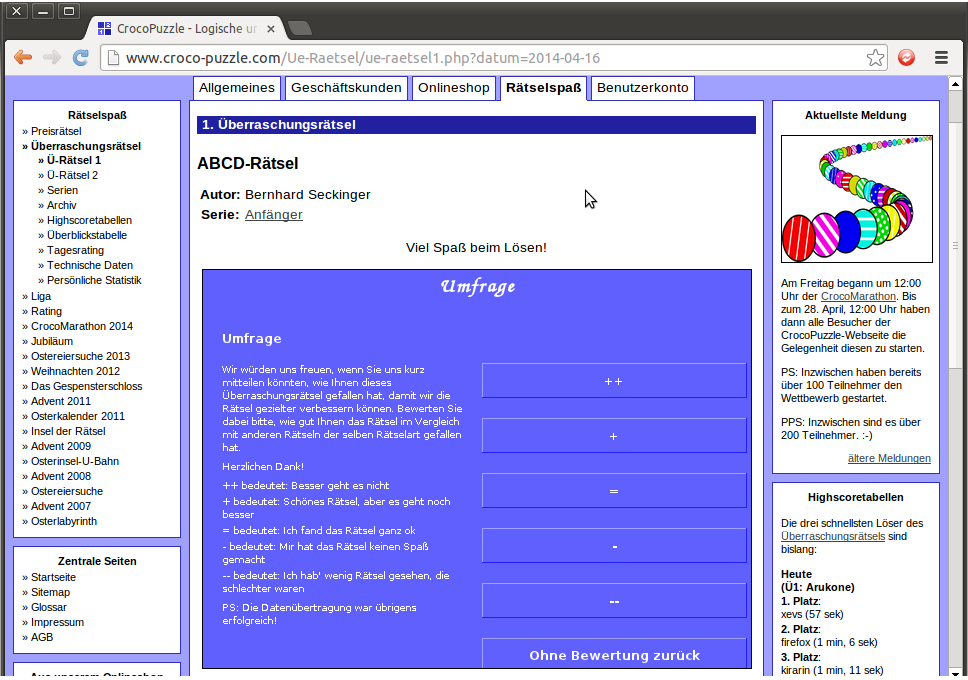
Here you can, optionally, rate the puzzle according to how much you enjoyed it: ++ for a particularly enjoyable puzzle, down to — for one you hated, or “Ohne Bewertung zuruck” if you don’t want to leave a rating at all. Returning to the previous page, you can see that your time has been filled in on the table like so:
Clicking on the HS button in the row of the puzzle we have solved, and scrolling to the bottom, we can see our time registered like so:
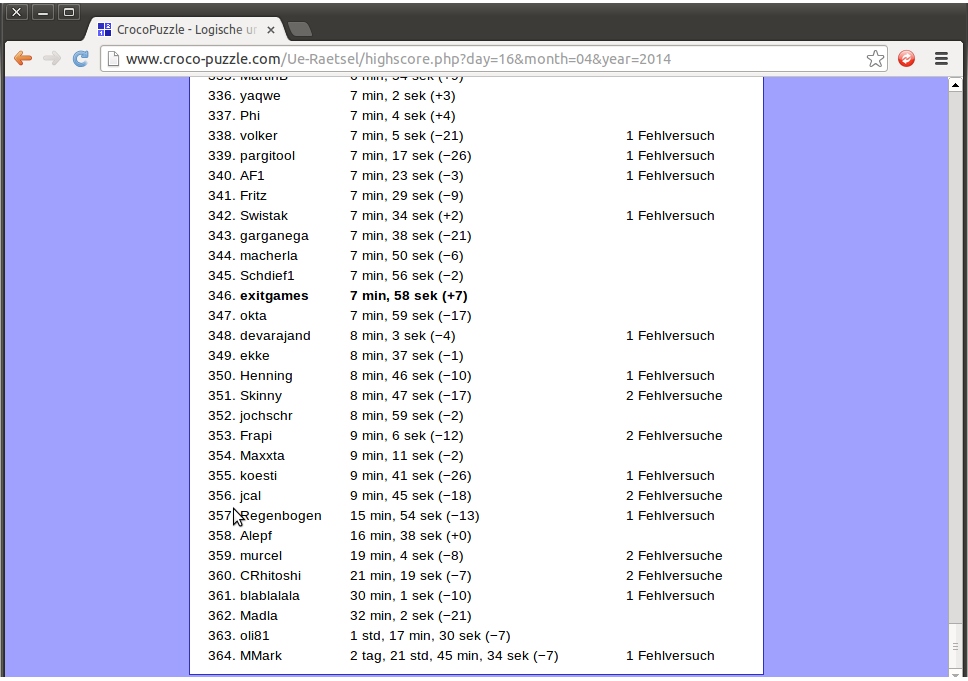
…so pretty near the bottom, but at least we solved the puzzle cleanly. When people have “1 Fehlversuch”, it means they pressed the “Testen” button when the puzzle was incorrectly solved; likewise, “2 Fehlversuche” means that they pressed “Testen” incorrectly twice.
This has been rather a direct route through the functionality of the applet. The prize puzzles walkthrough describes use of the “Anleitung” button for instructions, the “Ruckgangig” button to undo errors, and the colour buttons to change ink; those features can all be used in exactly the same fashion when solving daily puzzles.
Croco-Puzzle walkthrough: Registration § Prize puzzles § Daily puzzles § Freeform puzzles § The Croco-League § Ratings and ranking